

Are you trying to play the Love Island game, but it keeps freezing? It is very annoying when the game gets stuck on the loading screen at 20%, 50%, o
Are you trying to play the Love Island game, but it keeps freezing? It is very annoying when the game gets stuck on the loading screen at 20%, 50%, or just shows a blank screen.
Don’t worry, You do not need to delete your game and lose your progress at all. Most of the time, this happens because of a small network glitch or full phone storage.
In this guide, I will show you the easiest ways to fix the Love Island game stuck on loading screen error in just a few minutes. Let’s get started.
📱 Game Fixed? Join Our Community For Daily Error Fixes & APK Updates!
Love Island Game Stuck on Loading Screen Quick Info Overview
| Problem Details | Information |
| Game Name | Love Island: The Game |
| Common Issue | Stuck on Loading Screen / App Freezing |
| Fix Time Needed | 2 Minutes |
| Success Rate | 100% Working Fixes |
Click the button below to safely download the latest version of the game.
Important Note: Apkiraa.com is not partnered with the official game developers. All guides here are for informational purposes only. Any troubleshooting is done at your own risk, and we are not liable for any lost data or account bans.
If your game is already installed but you are stuck on the loading screen, keep reading below.
Top 4 Ways to Fix the Love Island Game Stuck on Loading Screen
Method 1: Force Stop and Clear App Cache
The most common reason your Love Island game gets stuck is because of very old or broken temporary files. These are called “cache files.” When too much of this junk piles up, the game gets confused and freezes on the loading screen like you are facing now.
Clearing the cache acts like a quick refresh for the app and usually fixes the problem instantly.
Here is exact steps how to do it on your phone.
1. First, open your phone’s Settings.
2. Just tap on “Apps or App Management” (this depends purely on your phone model).
3. Now, Scroll down your list of apps until you find the Love Island game, once you found that, give a click on it.
4.Next, tap the “Force Stop” button to completely close the frozen game.

5.Now, click on “Storage or Storage Usage“.
6.Finally, click the “Clear Cache” button.
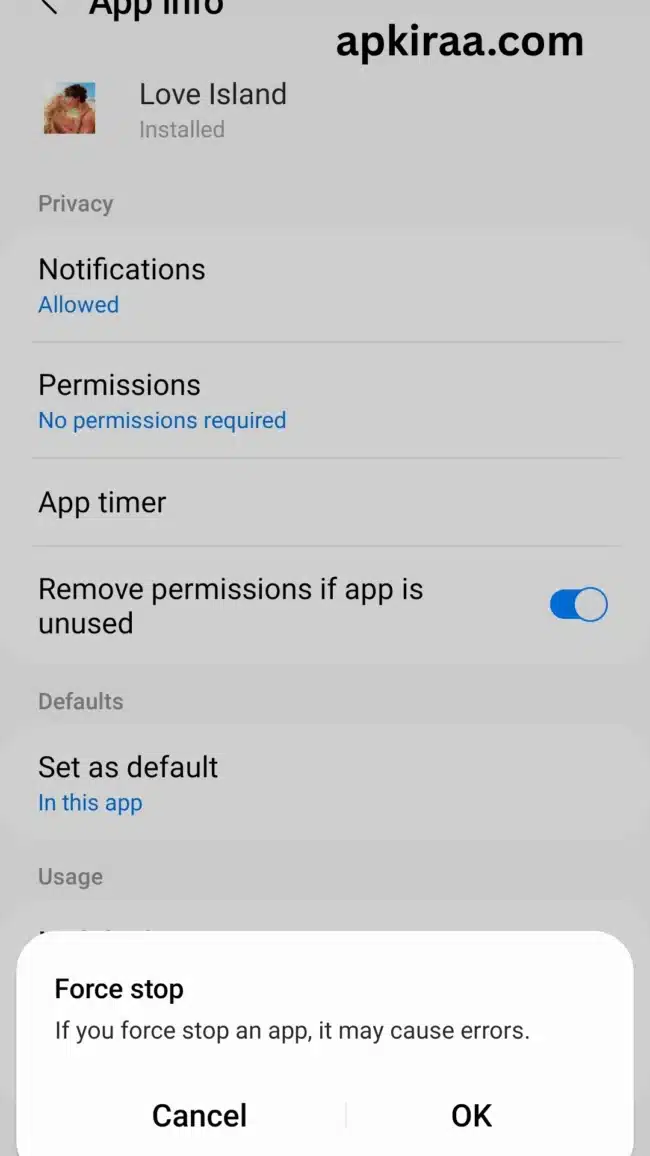
Important Warning: Make sure you only click “Clear Cache button.” Do NOT click “Clear Data.” If you click clear data by mistake, it will delete your account progress so far you maintained it, and you will lose all your saved outfits and story choices.
Method 2: Reset Your Internet Connection
Most of the time, the game gets stuck on the loading screen simply because your internet connection fails for a second. If your Wi-Fi or mobile data is too slow to connect to the game servers, the app will just freeze and wait.
A quick network reset usually fixes this problem right away. Here is what you need to do.
1. Swipe down from the top of your phone screen to open your quick settings.
2. Click on the “Airplane Mode” icon to turn it on.
3. Wait for about 10 to 15 seconds. This completely cuts off all network connections on your phone. At this time you will not receive any calls or messages.
4. Now, tap the “Airplane Mode” icon again to turn it off.
5. It will start reconnect to your Wi-Fi or Mobile Data, so please wait and open the game again.
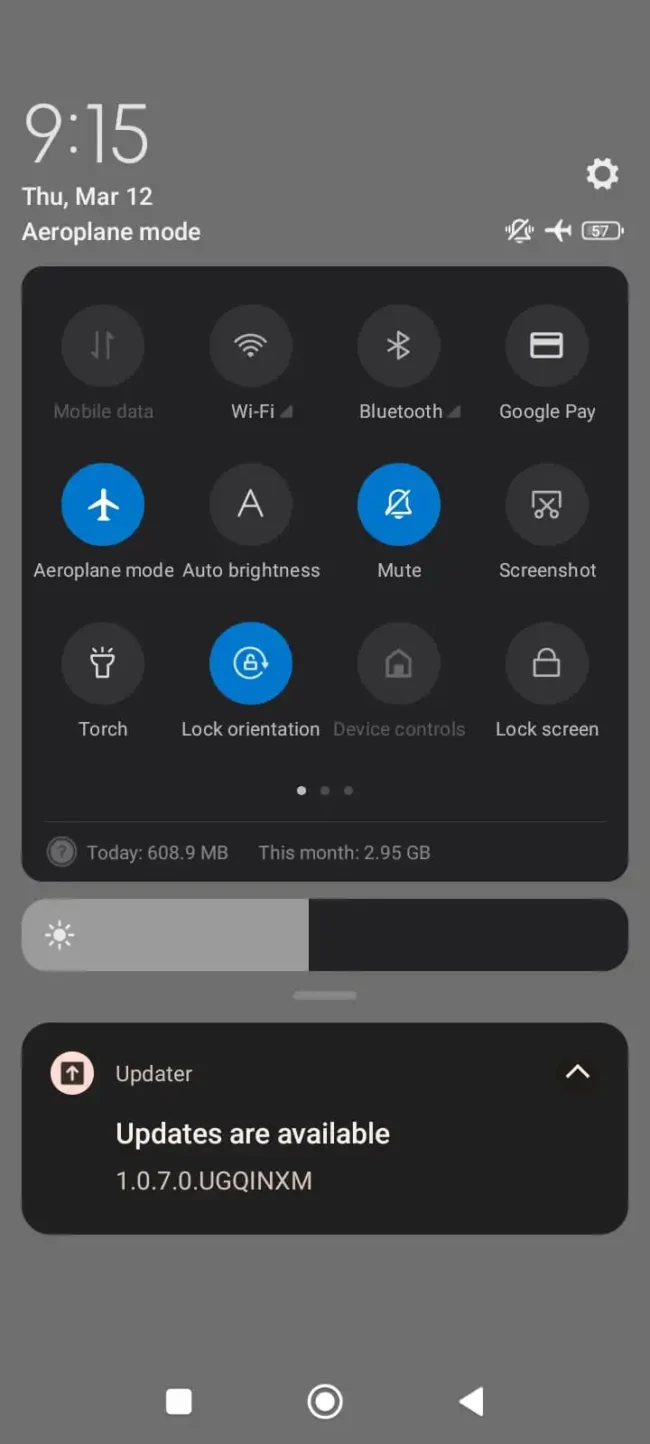
Bonus Tip: If you are using Wi-Fi at home, try turning it off completely and just using your Mobile Data. Sometimes, the Love Island game servers just don’t like certain Wi-Fi networks.
Method 3: Free Up Phone Storage Space
When you open the Love Island game, it often needs to download new character pictures, outfits, and story episodes in the background. If your phone’s memory is completely full, there is no room for the game to save these new files. When this happens, the game just gives up and gets stuck on the loading screen for that what you need to do is you must maintain some free space.
Giving your phone a little bit of breathing room can fix this immediately. Here is how to check.

1. If you want to maintain some space on your phone, you must open your phone’s Settings.
2. Very next step is, scroll down and look for Storage or Device Care, then click on it.
3. Check to see how much free space you have left.
4. You need to make sure you have at least 1GB or 2GB of free space for the game to run smoothly.
5. And If your phone is completely full, try deleting some old videos, big downloaded files, or other apps you never play anymore.
6. Once you make some space, restart your phone and open the game again.
Method 4: Update the Game to the Latest Version
Most of the time, you are failed to update the latest version, the game developers release a new update to fix bugs or add new characters. If you are playing on an older version of the game, the official servers will not let you log in. The game will just get stuck on the loading screen forever because it is waiting for you to update.
Here is how to make sure you have the newest version.
1. Very first step is, go to Google Play Store (or Apple App Store) on your phone.
2. Then, type “Love Island” into the search bar.
3. Now, Tap on the game when it pops up.
4. Look for a green button that says Update. If you see it, tap it and wait for the download to finish.
5. At last, If the button just says “Play,” then your game is already up to date.

Need help installing or updating? If your app store is acting up, or you need a step-by-step guide on how to install the game correctly, check out our full [Love Island Installation Guide].
What Causes the Love Island Network Connection Timeout Error?
When your device gets stuck on the loading bar or presents an endless loop, it means that your device’s cached data is out of sync with the live server. This is very common when Fusebox Games rolls out background hotfixes for new story seasons.To stop the Love Island game stuck on loading screen error, navigate to your device’s storage settings, select the app, and click Clear Cache. Avoid clearing data, as this will delete your local episodic story saves. If the issue persists during live TV broadcasts, the issue is more related to global server pressure than your local phone storage.
Frequently Asked Questions (FAQ’s)
Why does Love Island: The Game keep crashing on my phone?
The game often crashes due to low RAM or corrupt background update files. Make sure you have at least 3GB of free storage on your device, close all other background apps, and restart your device. If you are on Android, clearing the app cache through your storage settings will resolve most sudden app closes without losing your story progress.
How do I fix the “Network Error” on the Love Island app?
If you see a network verification error during live voting, the official show servers are experiencing high traffic congestion. You can bypass the verification block by toggling your connection from Wi-Fi to mobile data or by manually re-entering your phone number starting with the country code 1 in both fields on the SMS registration screen.
Why is my Love Island game stuck on a 20% or 50% loading screen?
Getting stuck at a certain percentage means the app failed to download the latest installment assets from Fusebox servers. To fix this, force close the app completely, disconnect from your current network for 10 seconds, reconnect to a stable Wi-Fi connection, and restart the game to force a new data handshake.
Will I lose my progress if I reinstall Love Island: The Game?
You will only lose your progress if you are playing on a guest account. If your game profile is linked to your Google Play, Apple ID or Facebook account, your story choices, gems and outfits are securely backed up in the cloud and automatically restored after a clean reinstall. You will only lose your progress if you are playing on a guest account. If your game profile is linked to your Google Play, Apple ID or Facebook account, your story choices, gems and outfits are securely backed up in the cloud and automatically restored after a clean reinstall.
Conclusion: Getting rid of the loading screen loop
Getting stuck in a loading bar is an incredibly frustrating roadblock, but it doesn’t mean your game progress is lost forever. As we have already discussed, a Love Island game stuck on loading screen error is often related to a temporary network data incompatibility. Whether it is your phone struggling to download a massive new episodic patch from Fusebox, or the official reality show’s voting servers buckling under millions of simultaneous fan requests.
Clearing your temporary app storage cache, setting up your verification phone numbers, and making sure you have a solid Wi-Fi handshake will bypass most loading freezes locally. Update your app to the latest build, give the servers a few minutes to breathe during peak TV polling windows, and you’ll be back to grafting and turning heads in no time. If you’re experiencing technical difficulties with other mobile titles or need the latest optimization walkthroughs, head back to our [Apkiraa Gaming Guides] hub to get your bugs fixed immediately.

COMMENTS